

How Strong Are Your Passwords?

By
June Adams
May 10, 2022
Share on:

How long do you think it would take a hacker to crack your current passwords?

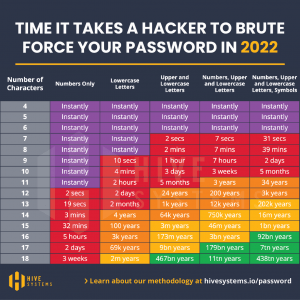
On average, it takes a hacker about 2 seconds to crack an 11-character password that only uses numbers. See the attached chart that illustrates the time it takes for a hacker to brute force attack your password. A brute force attack is when cybercriminals use trial and error to guess your details. Cybercriminals currently use sophisticated software that can run thousands of password combinations in a minute, but their technology and resources are only getting stronger.

A general rule is that your password should be at least 11 characters, utilizing both numbers as well as upper and lowercase letters. That combination will take hackers 41 years to crack. Regardless of the possible variations, the shorter your password, the easier it is to crack. Check out how long it will take a hacker to crack your password at https://www.security.org/how-secure-is-my-password/.

Lastly, simplify and secure your accounts by using a password manager that creates and stores all your passwords for you.
Strengthen your password security with the following tips:

  • Prioritize the length and complexity of your passwords.
  • Don't use personal information. This can be publicly available and easily accessible by hackers.
  • Avoid using dictionary words as passwords. Cracking tools can easily process every word in the dictionary.
  • Don't reuse passwords. If one account is breached, your other accounts would be vulnerable as well. Rather, use password managers, which are a convenient and secure way to manage complex passwords on multiple platforms.
  • Use multifactor authentication (MFA or 2FA) for especially sensitive accounts.
  • Avoid typing passwords while using public Wi-Fi. Instead, use a VPN or avoid websites that require your login information.




You may also like:

By
June Adams
January 4, 2022

As scammers get more sophisticated, be sure to protect yourself and your access points, such as your smartphone.

Start by making sure your phone is encrypted. Most phones, such as iPhones, Google Pixels and post-2018 Samsung phones are encrypted by default. Should you have a different model, search online for instructions on how to encrypt your phone.

Be sure to have a secure passcode for your phone. 6-digit passcodes are better than the standard 4-digit. Face or fingerprint recognition is secure as long as you use the phone’s built-in systems rather than a third-party. Utilize your smartphones’ “find phone” feature if it has one. Your smartwatch can also be utilized to locate a misplaced phone.

As your data can be intercepted on Wi-Fi networks that are not encrypted, it’s best to disable the Connect Automatically feature on your smartphone. This usually requires the simple UNCHECKING of a box. If storing payment methods electronically on your phone, only keep debit cards. Most vendors require a PIN to be entered when debit cards are used, adding an extra layer of protection. Lastly, should you be switching to a new phone, factory-reset the old phone after the switch, regardless of who will be receiving the old phone.

Ultimately, treat your phone with the same security as you treat your wallet, if not better.

By
June Adams
May 10, 2021

Weak passwords can compromise the best security tools and controls. With a never-ending list of applications and services that users and consumers access, people may have dozens of passwords to maintain at any given time. Often, the temptation to use familiar terms such as pet names, favorite teams or the names of children or friends can cause risk since much of those details can be discovered by a simple examination of social media.

Creating strong passwords offers greater security for minimal effort. Weak passwords can compromise the best security tools and controls. With a never-ending list of applications and services that users and consumers access, people may have dozens of passwords to maintain at any given time. Often, the temptation to use familiar terms such as pet names, favorite teams or the names of children or friends can
cause risk since much of those details can be discovered by a simple examination of social media.

Under Lock and Key
You can buy a small padlock for less than a dollar—but you should not count on it to protect anything of value. A thief could probably pick a cheap lock without much effort, or simply break it. And yet, many people use similarly flimsy passwords to “lock up” their most valuable assets, including money and confidential information. Fortunately, everyone can learn how to make and manage stronger passwords. It is an easy way to strengthen security both at work and at home.

What Makes a Password ‘Strong’?
Let’s say you need to create a new password that’s at least 12 characters long, and includes numerals, symbols, and upper- and lowercase letters. You think of a word you can remember, capitalize the first
letter, add a digit, and end with an exclamation point. The result: Strawberry1!

Unfortunately, hackers have sophisticated password-breaking tools that can easily defeat passwords based on dictionary words (like “strawberry”) and common patterns, such as capitalizing the first letter.
Increasing a password’s complexity, randomness, and length can make it more resistant to hackers’ tools. For example, an eight-character password could be guessed by an attacker in less than a day, but a 12-character password would take two weeks. A 20-character password would take 21 centuries. You can learn more about creating strong passwords in your organization’s security awareness training. Your organization may also have guidelines or a password policy in place.

Why Uniqueness Matters
Many people reuse passwords across multiple accounts, and attackers take advantage of this risky behavior. If an attacker obtains one password—even a strong one—they can often use it to access other valuable accounts.

Here is a real-life example: Ten years ago, Alice joined an online gardening forum. She also created an online payment account and used the same password. She soon forgot about the gardening forum, but someone accessed her payments account years later and stole a large sum of money.

Alice did not realize the gardening forum had been hacked, and that users’ login credentials had been
leaked online. An attacker probably tried reusing Alice’s leaked password on popular sites—and
eventually got lucky.

Guarding Your Passwords & PINS. Passwords and PINS protect sensitive data and it's critical to keep them safe. Try these best practices to stay protected.

1. Do not write them down – Many make the mistake of writing passwords on post-it notes and
leaving them in plain sight. Even if you hide your password, someone could still find it. Similarly, do
not store your login information in a file on your computer, even if you encrypt that file.
2. Do not share passwords – You cannot be sure someone else will keep your credentials safe. At
work, you could be held responsible for anything that happens when someone is logged in as you.
3. Do not save login details in your browser – Some browsers store this information in unsafe
ways, and another person could access your accounts if they get your device.
4. Use a password manager – These tools can securely store and manage your passwords and
generate strong new passwords. Some can also alert you if a password may have been
compromised.
5. Never reuse passwords – Create a unique, strong password for each account or device. This
way, a single hacked account does not endanger other accounts.
6. Create complex, long passwords – Passwords based on dictionary words, pets’ names, or other
personal information can be guessed by attackers.


Get Started on Your Financial Life Plan Today